

The app-versus-desktop question for avatar video is usually argued over rendering speed and timeline control. It should be argued over the voice. An avatar performance is only as convincing as its delivery, and that is why the AI dubbing tool layer, not the render layer, decides most real workflows. Our database of 114 AI media tools lets us count how the avatar and dubbing worlds actually overlap, and the overlap is where the practical answer lives.
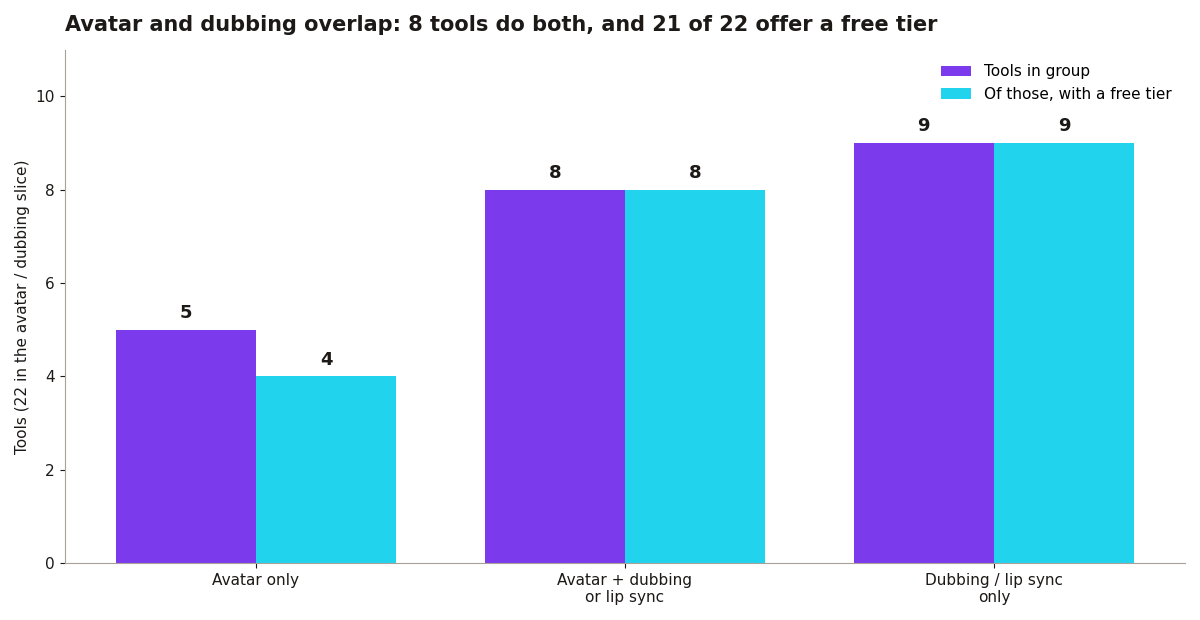
The overlap, counted. The database records 13 AI avatar tools. Separately, 17 tools across all categories list dubbing or lip sync among their recorded capabilities. Eight tools do both: DeepBrain AI, Hedra, HeyGen, Hour One, Synthesia, Synthesys, Tavus, and Yepic AI. Five avatar tools record no dubbing or lip sync capability: D-ID, KreadoAI, Mango AI, Vidnoz AI, and Virbo. And nine tools offer dubbing or lip sync without avatar generation, including Descript, ElevenLabs, Kapwing, Runway, and VEED. Just as telling, 21 of these 22 tools offer a free tier; every combined avatar-and-dubbing tool does, and every dubbing-only tool does. You can test the entire voice layer of your workflow for free before choosing where the avatar itself gets rendered.
Choose browser and mobile apps when: you need a video today (HeyGen or Synthesia in a browser beats any desktop setup for speed); you collaborate (share links, comments, and versions without file transfers); or your machine is weak (cloud rendering does not care about your laptop). Notice that the strongest app-side tools are exactly the eight that combine avatar and dubbing in one place, so the voice never has to leave the app as an export and come back as an import.
Choose desktop software when: you composite (After Effects plus a rendered avatar gives control no web app matches); you work offline or with sensitive footage (cloud upload is a non-starter for some clients); or you batch process (DaVinci Resolve plus scripts beats clicking through a web UI 200 times). The five avatar-only tools are the caution here: if the avatar is generated in one place and dubbed in another, the desktop timeline is where the two halves meet, and lip sync drift becomes your problem to fix by hand.
The hybrid most professionals land on. Generate the avatar performance in the cloud (HeyGen, $29/month), then composite, grade, and finish on desktop. Each side does what it is good at. The database suggests one refinement: pick the cloud half from the group of eight that records dubbing or lip sync as a built-in capability, so the performance and the voice are generated together rather than stitched.
Where the dubbing-only tools sit. The nine dubbing-only tools are not a random shelf. Four are video editors (Descript, Kapwing, Klap, and VEED), four are video generators (Higgsfield AI, Pika, PixVerse, and Runway), and one is a dedicated voice platform (ElevenLabs). That spread tells you how the market thinks about dubbing: it is a feature that belongs inside the tool where the video already lives, not a separate destination. If your avatar app lacks it, your editor or generator probably has it, which is why the stitch-it-on-desktop workflow so often turns into a stitch-it-in-the-editor workflow instead. Either way, the voice is handled somewhere other than the avatar tool, and every handoff is a chance for timing to slip.
Test the voice first, because it is free. Every one of the nine dubbing-only tools offers a free tier, and so do all eight combined avatar-and-dubbing tools. Before choosing an avatar platform, take your actual script, in your actual language, and run it through two or three of these free rungs. Listen for the things a spec sheet cannot tell you: pause placement, emphasis, and whether the voice still sounds like a person at the ninety second mark. If the voice fails, no render quality will save the video, and you will have learned it at zero cost. If the voice passes in a combined tool, the app-versus-desktop debate mostly settles itself, because the hardest layer is already handled in one place.
Price the voice layer before you commit. Dubbing is often where per-minute and per-character charges hide, so before paying for an avatar subscription, run it through the Before You Pay checker and price the full video, voice included. And for one-off spokesperson videos that do not justify a subscription at all, per-video pricing exists precisely for that gap. App or desktop is a real choice, but it comes second. First, decide where the voice is made.